Adding Core Facilities Question to the Standard Questionnaire
On Thursday, October 8th, the following question(s) will be added to the Standard Proposal Questionnaire in Proposal Development:
- Does this proposal utilize Core Facilities or shared research resources, check all that apply:
- □ Yes, an internal MSU Core Facility/shared research resource service will be used.
- □ Yes, an external Core Facility at a Co-Investigator-affiliated institution will be used.
- □ Yes, an external Core Facility will be used, that is NOT at a Co-Investigator-affiliated institution.
- □ No Core Facility/shared research resource services will be used.
- The More Information link to the above question will display - Core Facilities and Shared Research Resources (SRR) provide specialized services, instrumentation, expertise, data generation, analysis, models, reagents, or technologies that support research. MSU-specific Core Facility/SRR examples may include, but are not limited to: ADDRC, Advanced Molecular Imaging Facility, Bioinformatics Core, Center for Advanced Microscopy, Cryo-EM Facility, CSTAT, CTSI, Genomics Core, Greenhouses, Growth Chambers, Flow Cytometry Core, Henry Ford Health Core Facility, Proteomics Core, Mass Spec & Metabolomics Core, Medicinal Chemistry Facility, Metabolic Phenotyping & Preclinical Imaging Core, Transgenic & Genome Editing Facility, RadCore.
If “Yes, an internal MSU Core Facility/shared research resource service will be used” is selected as one of the responses to the above question, the following additional question will be prompted for a response:
- How will the MSU-specific Core Facility or shared research resource be used in this proposal? Check all that apply:
- □ Services are included in the proposal budget.
- □ Letter(s) of support are included.
- □ Core/shared resource staff are listed as key personnel and/or Co-Investigator.
- □ Preliminary data were generated using the core/shared resource.
- □ A critical model, reagent, technology, analysis, or specialized expertise is being provided.
- □ Other
- If Other is selected a text box will display requesting additional information be provided.
How do I incorporate the updated questionnaire?
As of October 8th, PDs with an In-Progress or Revisions Requested status will have an Update Available button at the top of the Standard Proposal Questionnaire.
- For in-progress proposals, please click the Update Available button to bring in the new questionnaire and answer the additional question(s) before routing the PD.
- For proposals that are recalled/returned out of route to make proposal corrections, you do not have to update the questionnaire.
- PDs created October 8th and beyond will automatically bring in the updated questionnaire (this does not include copied PDs – see below).
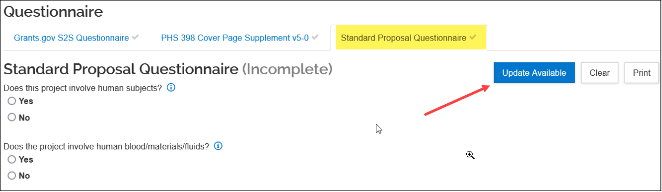
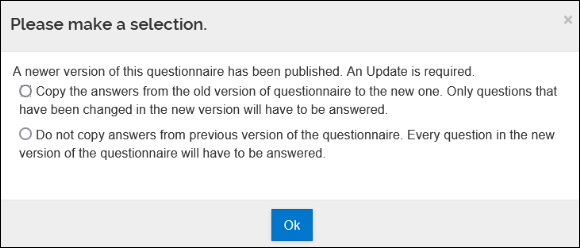
Once you click the Update Available button a popup window will appear asking if you’d like to copy over the answers from the old version of the questionnaire, or not. Select the choice you would like to make and click Ok.
What happens with copied proposals?
Copies of proposals that were created before October 8th will bring over an old version of the questionnaire. Click the Update Available button at the top of the Standard Proposal Questionnaire to bring the new version of the questionnaire into the copied proposal.
Please contact the KR Helpdesk if you have questions on how to update the questionnaire.

